PulseDev for Nuxt.Click it, fix the .vue.
Click any element in your running Nuxt app and say what’s wrong. Your agent opens the component behind it, and Vite HMR shows the edit before you approve the diff.
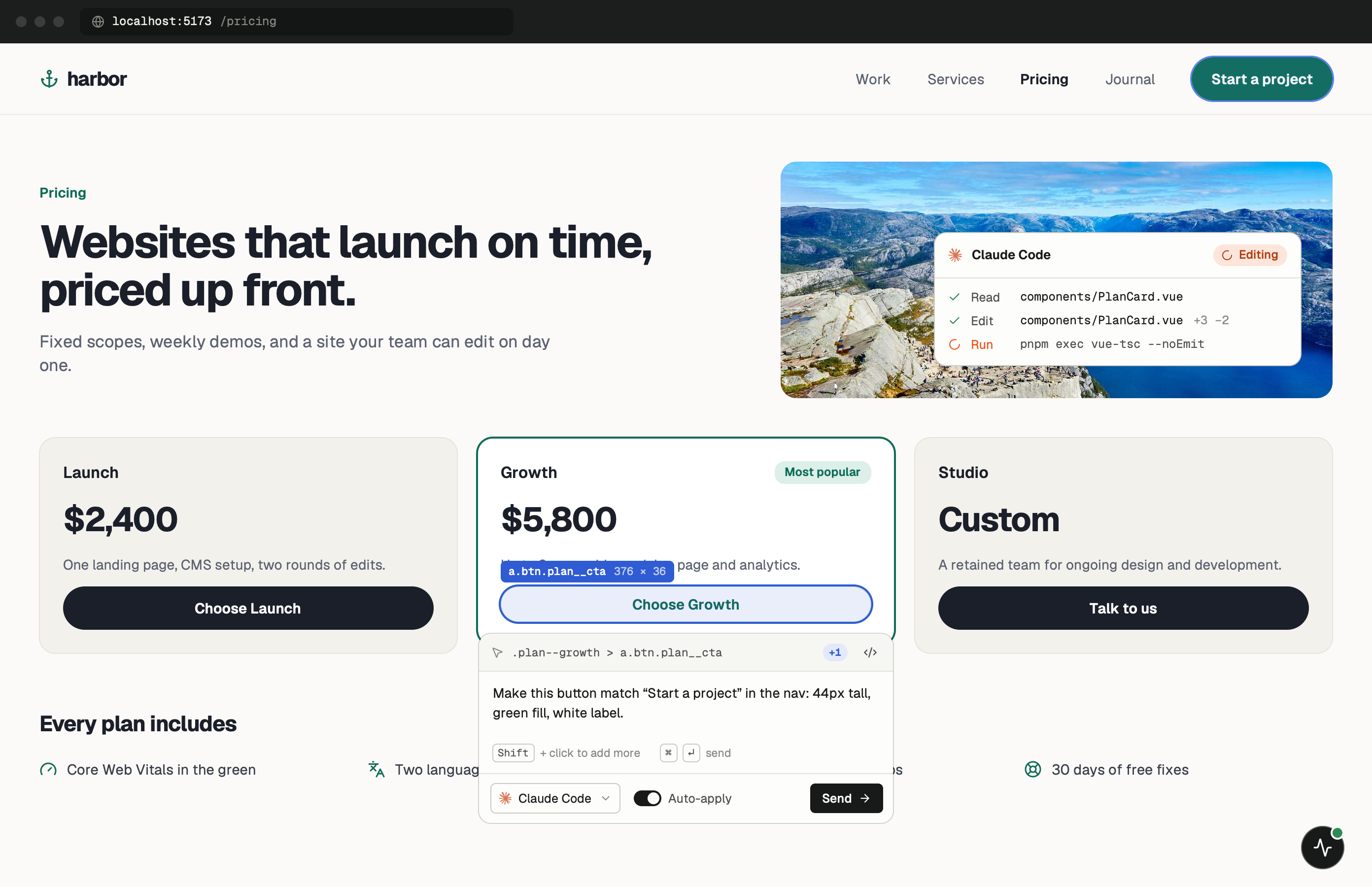
One minute of setup.
None of it ships.
Add one script to nuxt.config.ts and start your dev server. Keep the PulseDev app open while you work; it runs the server on port 3899 that the widget talks to. Set up project in the app shows this snippet with your token.
- Add
Add the script to your config.
It goes into app.head.script. The NODE_ENV check keeps it out of production builds.
nuxt.config.ts export default defineNuxtConfig({ app: { head: { script: "production" !== 'production' ? [{ src: 'http://localhost:3899/widget.js', 'data-token': 'YOUR_TOKEN' }] : [], }, }, }) - Run
Start Nuxt as usual.
The widget shows up in the corner of every page. Click it, then click the element you want changed.
terminal $npx nuxt dev➜Local:http://localhost:3000/➜PulseDev:widget connected
It fits how
Nuxt works.
A click carries more than a selector. The page, the element and its selector go to your agent, which follows them to the right file.
- composables/useCart.ts
Auto-imports
useFetch() and your composables resolve through auto-imports. The agent edits the file they live in instead of adding an import that shouldn’t be there.
- pages/pricing.vue
Pages and layouts
The page URL goes along with your note, so “only broken on /pricing” points your agent at pages/pricing.vue.
- server/api/plans.get.ts
Nitro routes
Your agent can follow a bug from the page into the server route behind it, because it reads your whole project.
Hot reload feedback
The agent edits your component and HMR shows the result in the same tab before you approve the diff.
Nuxt questions.
- Does it work with Nuxt 3 and Nuxt 4?
- Yes. The setup is identical for both.
- What does it cost?
- Free to start with 1 project, 1 agent and unlimited runs. Pro is $12 a month or $96 a year. Founder Lifetime is $149 once, for the first 200 buyers. Agent runs use the Claude Code, Codex, Gemini or OpenCode plan you already pay for.
- Does it work with Nitro?
- Yes. Your agent can edit server routes and API endpoints like any other file in the project.
- What about Nuxt UI and other modules?
- It works with Nuxt UI, Nuxt UI Pro and most modules. PulseDev reads the rendered page, so it doesn’t need to know your module list.
Your Nuxt app is running.Go point at the bug.
Windows coming soon. Free to start.