Runninglocalhost:3899
Point at your site. Approve the fix.
Click any element on your running site and say what’s wrong. PulseDev asks Claude Code, Codex or Gemini for a proposed diff that you review and apply in the widget.
Free to start. Uses the agent plan you already pay for. Runs on your machine, no PulseDev cloud.


Bring the agent you already pay for
- Claude Code
- Codex
- Gemini CLI
On any site you run locally
- Vue
- React
- Plain HTML
One loop.
Point, describe, approve.
No screenshots pasted into Slack, no ticket that says “the button looks off”. Feedback lands on the element itself, selector and page attached, so the agent opens the right file first time.
- 01
Point at the thing that’s wrong.
Turn on Inspect and hover your page. PulseDev outlines each element with its selector and size, so you click the exact button, not a screenshot of it.
Shiftclick to add more elements
- 02
Say what it should be.
Write the change in plain words, right next to the element. The selector, page and viewport go along with it, and you choose which agent picks it up.
⌘↵sends it to your agent
- 03
Review it on the page, then approve.
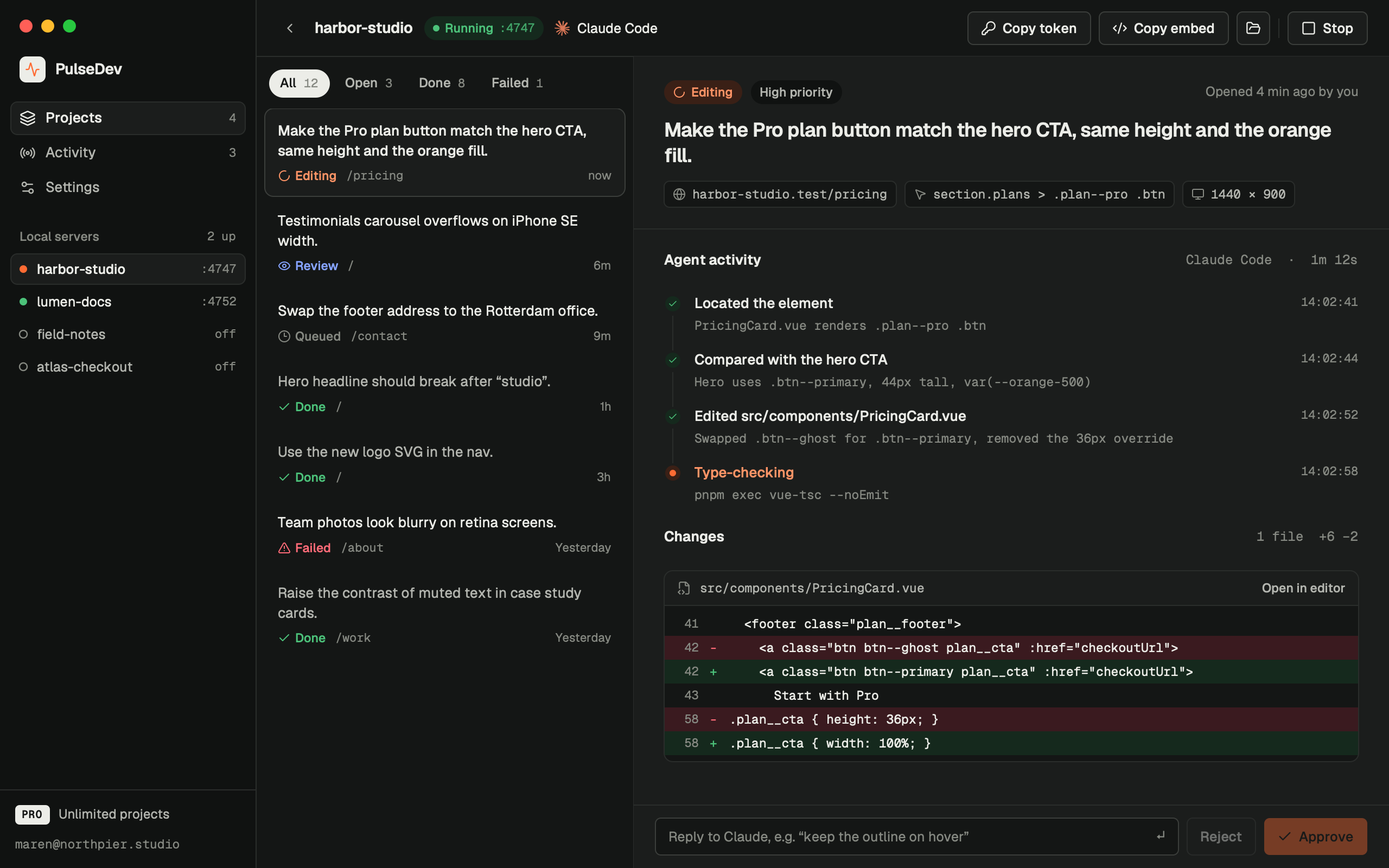
In review mode, PulseDev asks the agent to propose changes. Read the diff in the widget: Approve applies it to your files and your dev server updates the page. Reject discards it, or reply to iterate.
Review the proposed diff in the widget
See every file it touches, while it touches them.
The widget streams the agent’s work beside your page. Stop it mid-run, reply to steer it, or let it finish and review the change.
- Live log
- Every Read, Edit and command, streamed from the agent as it runs.
- Task board
- Queued, running, in review, done. Per page or across the whole site.
- Heads-up
- A sound and a toast when a fix is ready, so you can keep working.
One desktop app for every site you run.
Each project gets its own local server, port and agent. Start or stop them from the sidebar, and keep the full history of what changed and why.
Your browser. Your agent.
Your call on every change.
Editors now preview your site inside their own apps, locked to their own agent. PulseDev works where you already test, with whichever agent you like, and waits for your approval.
| Feature | PulseDev | Built-in previewsCursor, Claude Code, Codex | Copy-paste grabbersReact Grab, Agentation |
|---|---|---|---|
| Works in your own browserIncluding pages behind your login | Yes | In the vendor’s app | Yes |
| Any coding agentClaude Code, Codex, Gemini CLI | Yes | One vendor each | Paste or MCP |
| Approve the diff on the pageReview and apply proposed changes in the widget | Yes | Review in the editor | Hand-off only |
| Live agent log next to the elementEvery read, edit and command | Yes | In the app | No |
| A queue of fixes, not one promptPins, task list and board per page | Yes | Chat thread | No |
| Vue, React, Svelte, plain HTMLOne script tag, any stack | Yes | Varies | Mostly React |
| Runs locallyNo hosted server, no extra API bill | Yes | Yes | Yes |
What is PulseDev?
PulseDev is a macOS app that lets you fix a website by pointing at it. Open your site on localhost, click the element that looks wrong and write what it should be. PulseDev hands that note to the coding agent you already use (Claude Code, Codex or Gemini CLI) along with the page URL, the element’s selector, markup and styles, recent console errors and a screenshot of the element.
The agent runs on your Mac, in your project folder, with your own login. In review mode, PulseDev asks it to propose a diff rather than edit files. Read the proposal in the widget: Approve applies it to your files, then your dev server updates the page. Reject discards the proposal.
It’s made for developers who build sites with an AI agent and are tired of describing UI bugs in a chat window. There is no PulseDev cloud: the server runs on your machine and your code never reaches us.
- Platform
- macOS 13 or later, on Apple Silicon and Intel Macs
- Agents
- Claude Code, Codex, Gemini CLI
- Sites
- Anything on localhost, through the Vite plugin or one script tag
- Data
- Kept in ~/PulseDev on your machine
- Price
- Free for 1 project. Pro is $12 a month.
Founder Lifetime$49 once with HypershipdayFOUNDER. HyperShipDay offer, regularly $149. Unlimited projects and every agent. First 200 buyers only.
Nothing to host.
No PulseDev cloud.
PulseDev is a small server on localhost and one script tag. Your agent runs with your own login, in your own folder.
No cloud account
Tasks, messages and diffs live as JSON files in ~/PulseDev on your machine.
Your agent, your plan
It calls the Claude Code, Codex or Gemini CLI you already pay for. No extra tokens.
Dev only
The Vite plugin only runs in dev. For plain HTML, remove the tag before you deploy.
Free to start.
Cheap to keep.
No seats, no credits. You already pay for the agent; PulseDev is the layer on top. One license per person, activated in the desktop app.
Free
$0forever
Everything works. One site at a time.
- 1 project
- 1 agent of your choice
- Unlimited agent runs
- Widget, board and diff review
Pro
HyperShipDay$12$7per monthFor people who ship sites every week.
HyperShipDay · Use HypershipdayPRO at checkout
- Unlimited projects
- Every supported agent
- Unlimited agent runs
- Several local servers at once
5-day free trial, cancel anytime
Founder Lifetime
First 200 only$149$49oncePay once and keep it. Built for a local tool.
HyperShipDay · Use HypershipdayFOUNDER at checkout
- Everything in Pro
- No subscription
- One person, your own machines
What do people ask before they download?
Price, privacy, setup and refunds, in a few lines each. The docs and terms have the full detail.
How much does PulseDev cost?
PulseDev is free to start, with 1 project, 1 agent and unlimited agent runs. Regular prices are $12 a month or $96 a year for Pro, and $149 once for Founder Lifetime, for the first 200 buyers. For HyperShipDay, use HypershipdayPRO for $7/month Pro or HypershipdayFOUNDER for $49 Founder Lifetime. Pro starts with a 5-day free trial and adds unlimited projects, every supported agent and several local servers at once. Your agent’s own plan is billed by its vendor, as it is today.
Compare plansWhich coding agents does PulseDev work with?
Claude Code, Codex and Gemini CLI. PulseDev starts the agent you already have installed and signed in to, so there are no API keys to paste and no extra tokens to buy. The Free plan works with one agent of your choice. Pro and Lifetime unlock all three, and you pick which one takes each request.
Agent setupWhich frameworks and sites does it support?
Any site you can open on localhost. Set up project in the app adds the Vite plugin or a single script tag with your project token. There are setup guides for React, Next.js, Vue, Nuxt, Astro, SvelteKit, Remix, Solid, Laravel, Hugo, Jekyll, Eleventy and plain HTML. The Vite plugin only runs in dev. For plain HTML, remove the tag before you deploy.
Framework guidesDoes PulseDev send my code anywhere?
No. PulseDev has no AI service of its own and never receives your code or prompts. The widget talks only to the server on your Mac, and your agent sends prompts and files to its own vendor, the same as when you run it in a terminal. The app contacts pulsedev.app only for license checks, prices and anonymous usage events, and you can switch the usage events off in Settings.
Privacy policyIs there a Windows version?
Not yet. PulseDev runs on macOS 13 or later, on Apple Silicon and Intel Macs, and Windows is listed as coming soon. You can still check your site on other devices: turn on Allow network access in the app’s settings and open the page on your phone. The project token is required either way.
Download for macOSHow does approving a change work?
In review mode, PulseDev asks the agent to propose changes rather than edit files. The widget shows the proposed diff. Approve applies it to your files, then your dev server updates the page. Reject discards the proposal. If it’s close but not right, reply and the agent picks up from there. The activity log shows the agent’s progress, and you can stop the run at any point.
Can my editor read the feedback over MCP?
Yes. Click Connect editor (MCP) in the app and PulseDev writes the MCP config for Claude Code (.mcp.json), Cursor (.cursor/mcp.json) or VS Code (.vscode/mcp.json). Your editor can then list, read and close the annotations you left on the page, so the feedback you collected in the browser is waiting for you in the IDE.
Editor setupCan I get a refund?
Yes. Every paid plan has a 14-day money-back guarantee. For Pro it counts from your first payment after the trial, and for Founder Lifetime from the day you buy. Email [email protected] within 14 days for a full refund, no questions asked. A refund deactivates the license. Each license is for one person on up to 3 machines.
Refund policy
Your agent is waiting
Stop writing bug reports. Point at the bug.
5-day free trial on Pro. Windows coming soon.